

HCC Coder alternative
HCC Coder alternative for risk adjustment coders
HCC Coder is a dedicated risk-adjustment product with code lookup, calculators, batch scoring and licensed reference options. HCC Buddy combines its HCC reference workflow with Ask Buddy and a Chrome extension. Test the tasks you need and verify each plan’s contents.
| Feature | HCC Buddy | HCC Coder |
|---|---|---|
| ICD-10-CM Code Lookup | 74,000+ codes | ICD-10 code search |
| HCC Category Mapping | current CY2026 V28 + historical PY2025 V24 reference | See vendor |
| Code-level RAF context | Source-labeled references | Included |
| Member RAF scoring | V28 PY2026, complete context required | Not compared |
| Coding question assistant | Ask Buddy (included) | Not verified |
| NPI Provider Lookup | NPPES reference lookup | Not verified |
| Drug-to-Diagnosis Reference | Included | Wolters Kluwer drug database; verify tier |
| Chrome Extension | Side panel + floating sidebar | Not verified |
| Code Bookmarks | Unlimited bookmarks | Not verified |
| Dark Mode | Full dark mode support | Not verified |
| Price | $19.99/mo founder price (originally $29.99/mo) or $199.99/yr | Standard $515/user/year; Pro $750/user/year |
| Free Tier | 3 lookups/day | Limited demo |
| Free Trial | 7 days full access, no card | Demo access |
Why coders look for an HCC Coder alternative
Use a familiar lookup, a documentation question and a saved-reference task in each product. Check the source, subscription tier and number of steps needed to finish.
Ask Buddy for coding questions
Use a familiar lookup, a documentation question and a saved-reference task in each product. Check the source, subscription tier and number of steps needed to finish.
One platform vs a focused crosswalk
Use a familiar lookup, a documentation question and a saved-reference task in each product. Check the source, subscription tier and number of steps needed to finish.
Compare plan prices and scope
HCC Coder lists Standard at $515/user/year and Pro at $750/user/year. An earlier $4.95/month offer could not be reverified in the current catalogue. HCC Buddy Pro is $19.99/mo founder price (originally $29.99/mo) or $199.99/year. Compare actual tier contents and current terms.
Where HCC Coder is still the better fit
Use a familiar lookup, a documentation question and a saved-reference task in each product. Check the source, subscription tier and number of steps needed to finish.
Disclaimer: HCC Buddy is not affiliated with HCC Coder or hcccoder.com. Product details based on publicly available information checked September 4, 2026 and may have changed since this page was last updated. This comparison is provided for informational purposes only.
Risk-adjusting code hub
Want to verify the V28 code-path depth yourself?
HCC Coder shoppers usually care about whether a tool helps with real V28 work, not just a feature row. This directory opens the mapped ICD-10 set directly so coders can check the code-path depth for themselves.
Directory page 1
A01.04 to C34.12
250 billable mapped codes
Directory page 2
C34.2 to C62.91
250 billable mapped codes
Directory page 3
C62.92 to C81.49
250 billable mapped codes
Directory page 4
C81.4A to C84.75
250 billable mapped codes
Directory page 5
C84.76 to D03.72
250 billable mapped codes
Directory page 6
D03.8 to E08.3513
250 billable mapped codes
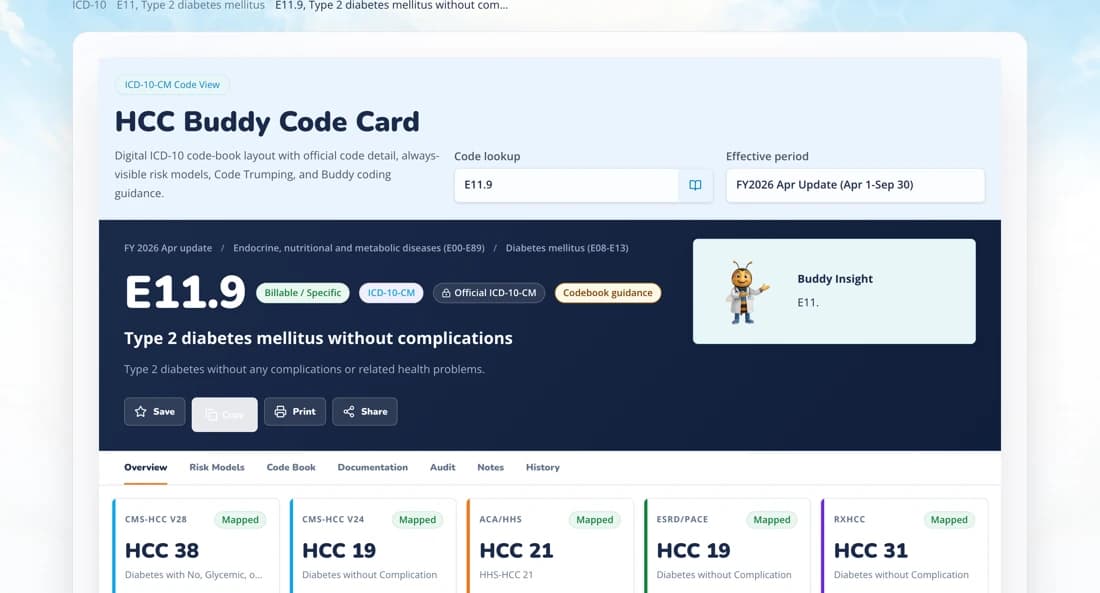
See the mapping HCC Buddy does in one card
One ICD-10-CM lookup reports the current CY2026 V28 result and a historical PY2025 V24 reference, with CMS source labels visible. The RAF tool shows a CMS-HCC V28 PY2026 member result only with the complete diagnosis set and member details and passing CMS source checks. Otherwise, it shows no score.
Compare with your real workflow
Compare the tasks you use every day.
If you already like a focused crosswalk, compare what happens when NPI lookup, drug reference, V28 PY2026 member requirements, and Ask Buddy sit next to the Encoder instead of in separate tabs.
Or see the full HCC coding software toolkit — every lookup, calculator, and reference in one place.
Keep the HCC Coder comparison notes
Get short notes for coders comparing risk-adjustment reference tools.
Short notes only. Unsubscribe anytime.