

HCC Coding Chrome Extension
HCC Buddy puts ICD-10-CM lookup, HCC mapping, NPI search, and coding questions in Chrome’s side panel.
7-day free trial, no card required • Cancel anytime
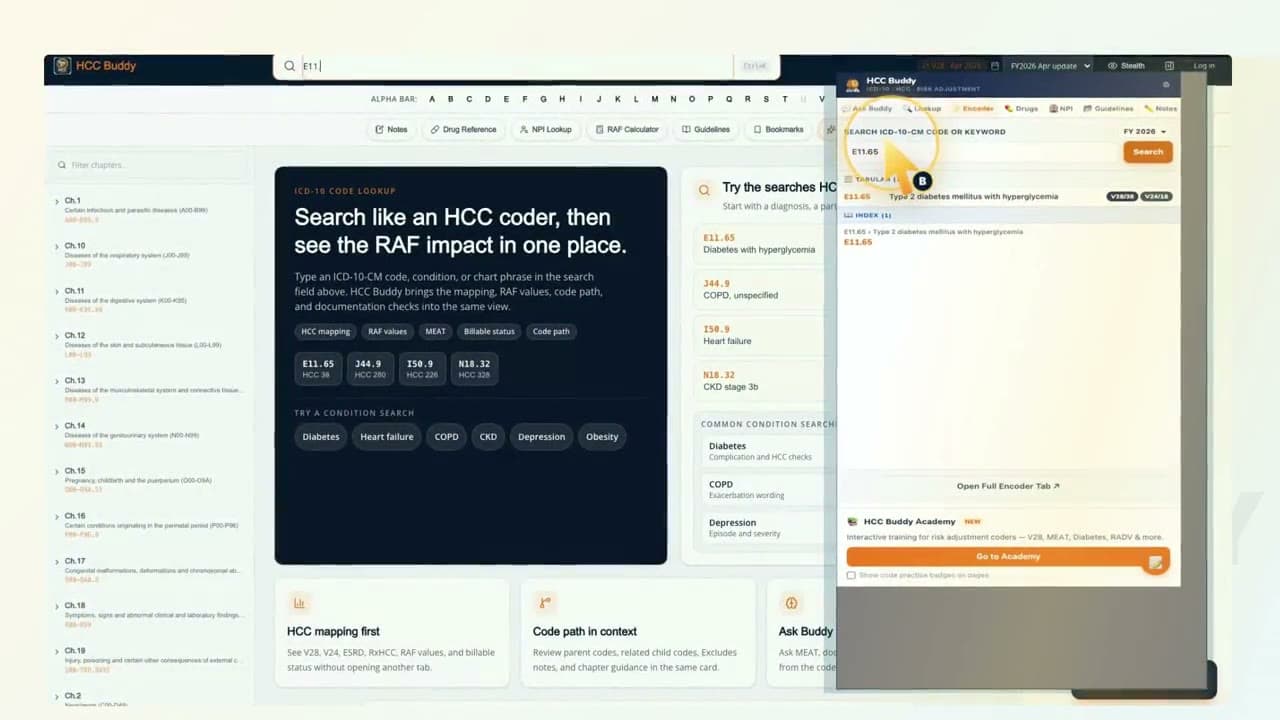
Keep the lookup beside your browser work
The panel opens beside the browser page you are reviewing. No separate desktop app is required. If your organization manages Chrome extensions, follow its browser policy.
Stays in the same tab as your EMR
Open the side panel with Ctrl+Shift+H on Windows or Command+Shift+H on Mac. Chrome lets you change extension shortcuts. Look up a code beside your browser page.
Right-click any term to look it up
Select text, right-click, and choose 'Look up in HCC Buddy.' When you need more room, open the full encoder in its own tab.
Your coding teammate
Stuck on a code path? Ask Buddy.
Ask the way you would ask a senior coder down the row. Check MEAT criteria, work through a guideline conflict, or talk out a sequencing call, and get the reasoning, not just a code. The sourced answer stays next to the chart you are reviewing.
Also included
Bookmarks and code card tools
Keep frequent ICD-10-CM codes in reach, then open HCC mapping and Ask Buddy without leaving the panel. Use the web RAF Calculator for member scoring.
Built-in tools
ICD-10-CM encoder, drug reference, NPI lookup, and guidelines library in the panel. Tracker entry and new free-text notes are paused.
Works with your chart
Built for chart review. Open alongside Epic, Cerner, Athena, or any web-based EHR.
Three-step browser lookup
How to find an HCC category fast
Keep the browser page open, search once in the side panel, and review the mapping with the code path still in view.
- 1
Open the HCC Buddy side panel
Keep the browser page you are reviewing open, then click the HCC Buddy icon in Chrome.
- 2
Search the documented diagnosis or ICD-10-CM code
Type the code or condition once. You can also select text on the page, right-click, and send it to HCC Buddy.
- 3
Review the HCC mapping before you code
Check billable status, the code path, and the V28 or V24 mapping shown with the result. Code only what the documentation supports.
Two terms to keep straight
- ICD-10-CM code
- The diagnosis code you search and validate against the current code set.
- HCC category
- The CMS-HCC model category a qualifying diagnosis may map to for risk adjustment.
Reviewed July 10, 2026 against the CMS 2026 model software and mappings.
Install the extension in three steps
Install from Chrome Web Store
One click to add HCC Buddy to your browser.
Click the HCC Buddy icon
Open the side panel from your browser toolbar.
Search, map, and ask Buddy
Pull up a code, check the V28 HCC, and ask Buddy if the documentation supports it. All from the side panel while the chart is still open.
Browser, account, and support details
Check the practical details before you add the extension to a work or personal browser.
Supported browsers
Chrome, Edge, Brave, and Arc. A Firefox extension is not currently available.
One HCC Buddy account
Use the same sign-in on the website and extension. There is no separate extension purchase.
Official listing
Review the publisher, permissions, and listing details in the Chrome Web Store.
Setup help
Read the extension setup guide or contact HCC Buddy.
HCC coding Chrome extension questions
Is the HCC Buddy Chrome extension free?
It is free to install. The HCC Buddy free tier includes 3 code lookups each day. Pro starts with a 7-day trial, and no card is required.
How do I find an HCC category fast in Chrome?
Open the HCC Buddy side panel, search the diagnosis or ICD-10-CM code once, and review the HCC mapping shown with the result. You can also right-click selected text and send it to HCC Buddy.
Can the extension stay beside a browser-based chart?
Yes. Chrome's side panel keeps HCC Buddy beside the page you are reviewing. It does not replace your coding judgment or connect itself to the chart system.
What does the HCC coding Chrome extension include?
The panel includes ICD-10-CM lookup, current V28 mapping, historical PY2025 V24 references, NPI lookup, coding guidelines, and Ask Buddy. Member scoring stays in the web RAF Calculator, which supports CMS-HCC V28 PY2026 with complete member context and shows no score unless every required check passes.
Simple, Transparent Pricing
Pro
$29.99 $19.99/mo founder price
or $199.99/yr, 7-day free trial (no card)