

Encoder comparison
HCC Buddy vs Find-A-Code for HCC coders
Find-A-Code is a broad coding and billing suite. HCC Buddy is a focused risk adjustment workspace. If your day is mostly ICD-10-CM, HCC mapping, current CY2026 V28 and historical PY2025 V24, and RAF reference checks, the narrower tool may fit better. The RAF tool shows a CMS-HCC V28 PY2026 member result only with the complete diagnosis set and member details and passing CMS source checks. Otherwise, it shows no score.
| Feature | HCC Buddy | Find-A-Code |
|---|---|---|
| ICD-10-CM lookup | Included | Included |
| ICD-10 to HCC mapping | Built around current CY2026 V28 and historical PY2025 V24 | Included in broader crosswalk tools |
| V28 PY2026 member requirements | V28 PY2026, complete context required | See vendor docs |
| HCC-first screen layout | Not verified | |
| CPT and HCPCS coding | Core strength | |
| Facility, ASC, DRG, APC, and RVU tools | Core strength | |
| NPI lookup | Included | Included |
| Drug reference | Included | Included |
| Chrome extension for browser chart review | Included | Not verified |
| Monthly price shown publicly | $19.99/mo founder price (originally $29.99/mo) or $199.99/yr | $45, $75, or $95 tiers |
| Annual price shown publicly | $199.99 | $450, $750, or $950 tiers |
Find-A-Code is broader. HCC Buddy is more focused.
Find-A-Code is useful when a coder needs one place for ICD-10-CM, CPT, HCPCS, RVUs, NCCI edits, facility tools, fee schedules, and policy lookup. That breadth matters for billing teams and facility coders. HCC Buddy does not try to cover all of that. It keeps the screen centered on the details risk adjustment coders check all day: HCC category, current CY2026 V28 model, historical PY2025 V24 reference, V28 PY2026, complete context required, billable status, notes, and related codes.
The best fit depends on what you code every day.
If your job mixes E/M, CPT, HCPCS, facility payment, and payer policy research, Find-A-Code has more of the all-purpose coding desk covered. If your work is mainly Medicare Advantage risk adjustment, a leaner HCC-first workflow can be faster. HCC Buddy keeps the ICD-10-CM lookup, HCC mapping, NPI lookup, drug reference, and Chrome extension close together so you are not rebuilding that stack with separate tabs. The RAF tool shows a CMS-HCC V28 PY2026 member result only with the complete diagnosis set and member details and passing CMS source checks. Otherwise, it shows no score. Check the V28 PY2026 member requirements.
Where Find-A-Code wins
Find-A-Code is the stronger choice for broad coding departments. It publishes Professional, Expert, and Facility/ASC packages, and its feature list includes CPT, HCPCS, RVUs, NCCI validation, LCD/NCD policy lookup, E/M tools, fee schedules, DRG/APC work, and custom code lists. HCC Buddy does not include CPT or facility reimbursement tools, so it should not replace a full coding suite for teams that depend on those features.
Where HCC Buddy wins
HCC Buddy wins when the job is diagnosis and risk adjustment review. The workflow starts with ICD-10-CM lookup, then shows the current CY2026 V28 and historical PY2025 V24 HCC view, RAF context, related codes, and chart review reminders in the same place. The Chrome extension also gives coders a side panel next to browser-based chart work. That matters when the problem is speed, fewer tabs, and less hunting during HCC review.
Disclosure: HCC Buddy is not affiliated with Find-A-Code. Product and pricing details are based on publicly available Find-A-Code pages reviewed in May 2026. Features and pricing can change, so check the vendor site before you buy.
Risk-adjusting code hub
Want to compare with a real HCC code?
Open a mapped ICD-10-CM page and check the HCC category, source-labeled RAF reference coefficient, and related code path. A feature table is useful, but coders usually know after one familiar lookup.
Directory page 1
A01.04 to C34.12
250 billable mapped codes
Directory page 2
C34.2 to C62.91
250 billable mapped codes
Directory page 3
C62.92 to C81.49
250 billable mapped codes
Directory page 4
C81.4A to C84.75
250 billable mapped codes
Directory page 5
C84.76 to D03.72
250 billable mapped codes
Directory page 6
D03.8 to E08.3513
250 billable mapped codes
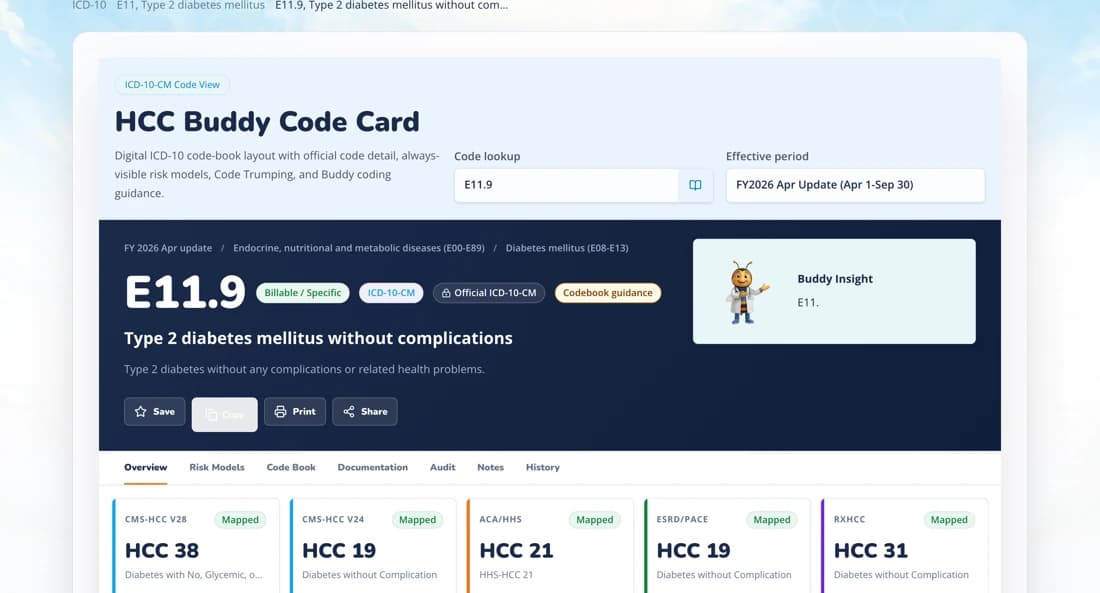
See the mapping HCC Buddy does in one card
One ICD-10-CM lookup reports the current CY2026 V28 result and a historical PY2025 V24 reference, with CMS source labels visible. The RAF tool shows a CMS-HCC V28 PY2026 member result only with the complete diagnosis set and member details and passing CMS source checks. Otherwise, it shows no score.
Compare with your real workflow
Run one HCC-heavy code through HCC Buddy.
Pick a code you already know. Check the ICD-10-CM detail, current CY2026 V28 and historical PY2025 V24 mapping, source-labeled RAF reference coefficient, related codes, and chart-review reminders without leaving the HCC workflow.
Or see the full HCC coding software toolkit — every lookup, calculator, and reference in one place.
Keep the Find-A-Code comparison notes
Get short notes for coders comparing broad coding suites with HCC-focused workflows.
Short notes only. Unsubscribe anytime.